Table of Contents
ToggleTransforming a spare room into a dedicated home theater delivers an entertainment experience that rivals commercial cinemas, without the overpriced popcorn or sticky floors. A well-executed home theater combines smart room selection, quality equipment, acoustic treatment, and thoughtful design to create an immersive viewing environment. The project ranges from moderately complex to advanced depending on the level of soundproofing and customization involved. This guide walks through the essential steps, from space planning and equipment selection to acoustic optimization and seating layout, helping homeowners build a theater that fits their space, budget, and technical comfort level.
Key Takeaways
- Building a home theater requires strategic room selection with ideal dimensions around 1.6:1 ratio (width to length) to minimize acoustic dead spots and standing waves.
- A proper home theater audio system must include at least a 5.1 surround setup with a quality center channel speaker and subwoofer positioned through bass crawl testing for optimal sound.
- Acoustic treatment using fiberglass panels at reflection points and bass traps in corners dramatically improves sound clarity without the cost of full soundproofing modifications.
- Optimal viewing distance for a home theater display is 1 to 1.5 times the screen diagonal, with seating arranged no more than 30 degrees from screen center.
- Proper lighting control—including blackout solutions, dimmable LED fixtures, and bias lighting—is essential to eliminate contrast washout and maintain immersion.
- Home theater projects range from entry-level ($3,000–$6,000) to high-end setups ($20,000+), with significant cost savings available through phased builds and previous-generation equipment purchases.
Planning Your Home Theater Space
The foundation of any successful home theater starts with selecting and configuring the right space. Room dimensions, layout, and ambient conditions significantly impact both audio quality and viewing experience.
Choosing the Right Room Layout and Size
Ideal home theater rooms are rectangular with dimensions that avoid perfect squares, which create standing waves and audio dead spots. A room ratio of approximately 1.6:1 (width to length) minimizes acoustic issues. Finished basements work exceptionally well due to their isolation from household noise and lack of exterior windows.
Minimum recommended dimensions are 12 feet wide by 18 feet long, though smaller spaces can work with careful equipment selection. Ceiling height matters too, 8 feet is workable, but 9-10 feet allows for proper acoustic panel placement and overhead speaker installation if pursuing Dolby Atmos or DTS:X surround formats.
Avoid rooms with excessive windows unless prepared to invest in blackout solutions. Light bleed ruins contrast ratios on even the best projectors. Similarly, rooms with irregular angles, alcoves, or open doorways complicate speaker placement and sound control.
Check whether the space has access to dedicated 15-amp or 20-amp circuits. Home theaters draw significant power, and sharing circuits with other rooms can trip breakers during peak usage. If planning to run wiring through walls or install recessed equipment, confirm the space isn’t load-bearing and doesn’t contain critical plumbing or HVAC runs. Structural modifications may require permits, check local building codes before cutting into framing.
Essential Home Theater Equipment and Technology
Equipment selection determines both performance ceiling and long-term satisfaction. Focus budget on components that deliver measurable improvement in picture and sound quality.
Display Options:
Projectors create the most cinematic experience for rooms with controllable lighting. A 4K DLP or 3LCD projector paired with a 100-120 inch screen delivers immersive visuals. Entry-level 4K projectors start around $800-$1,200, while screens range from $200 for fixed frames to $1,500+ for motorized models. Throw distance matters, measure the space from screen to seating position and match projector specs accordingly.
Large-format TVs (75-85 inches) work for smaller rooms or spaces with ambient light challenges. OLED panels offer superior black levels and contrast, while QLED models provide higher peak brightness. Modern smart home automation allows seamless integration with lighting and control systems.
Audio System:
A proper surround sound system is non-negotiable. At minimum, deploy a 5.1 setup: left, center, right, two surrounds, and a subwoofer. The center channel handles 60-70% of dialogue, so don’t cheap out here. AV receivers should support 4K passthrough, HDR formats (Dolby Vision, HDR10), and enough power to drive speakers without distortion, look for 100+ watts per channel into 8 ohms.
Subwoofer placement dramatically affects bass response. Corner placement amplifies output but may create boominess. Experiment with the “subwoofer crawl”, place the sub at the listening position, play bass-heavy content, and walk the room perimeter to find where bass sounds tightest and most even.
Source Components:
A quality 4K Blu-ray player remains the gold standard for picture and audio quality. Streaming devices (Apple TV 4K, Nvidia Shield, Roku Ultra) handle apps and streaming services but depend on internet bandwidth, 4K HDR streaming needs sustained speeds of 25+ Mbps. Hardwire streaming devices via Ethernet whenever possible to avoid Wi-Fi dropouts during critical scenes.
Optimizing Acoustics and Soundproofing
Audio quality suffers when sound reflects off bare walls, glass, and hard floors. Treating acoustics transforms muddy, echoing audio into clear, balanced sound.
Acoustic Treatment vs. Soundproofing:
These serve different purposes. Acoustic treatment improves sound within the room using absorption and diffusion panels. Soundproofing prevents sound transfer to adjacent spaces, a structural concern requiring wall and ceiling modifications.
For acoustic treatment, start with 2-inch thick fiberglass or mineral wool panels at first reflection points, the spots on side walls where sound from front speakers bounces toward the seating area. Use a mirror trick: sit in the main seat, have someone slide a mirror along the wall until you see the speaker reflection, that’s a reflection point. Mount panels there using Z-clips or construction adhesive.
Add bass traps in corners where low frequencies accumulate. These typically use 4-inch thick material or specialized corner-mounted designs. A room sounds noticeably tighter with just four corner bass traps installed.
Soundproofing gets expensive fast. Adding a second layer of 5/8-inch Type X drywall with Green Glue damping compound between layers reduces sound transmission but requires removing existing drywall. Resilient channels or decoupling clips isolate the new drywall from studs, preventing vibration transfer. This level of work often requires permits and possibly professional installation, especially for ceiling work.
For less invasive soundproofing, seal gaps around doors with weatherstripping and install a solid-core door if the room currently has a hollow-core model. Add heavy curtains or acoustic blankets over any windows. Carpeting with thick padding absorbs sound far better than hardwood or tile, rugs work in a pinch but wall-to-wall carpet performs best.
Lighting Design and Ambiance Control
Lighting control separates amateur setups from polished home theaters. Unwanted light sources wash out screen contrast and ruin immersion.
Eliminate Light Sources:
Remove or disable any light that shines directly toward the screen or viewing area. Cover LED indicators on equipment with black electrical tape, those tiny blue and red lights are surprisingly distracting in a dark room. Install blackout roller shades or double-layered blackout curtains over windows. Curtains should extend several inches beyond the window frame on all sides to prevent light seepage.
Ambient and Accent Lighting:
Dimmable recessed LED lights work well for general illumination before and after viewing. Wire them to a dimmer switch compatible with LED loads, standard incandescent dimmers often cause LED flicker. Position lights to avoid screen reflections and glare.
LED strip lights behind the screen or along baseboards create subtle bias lighting that reduces eye strain during long viewing sessions. Stick with warm white (2700-3000K) to avoid the sterile blue cast of cool LEDs. RGB strips offer color-changing effects for pre-show ambiance but should be turned off during actual viewing.
Install all lighting on separate zones controlled via wall switches or a smart home system for one-touch scene control. A “Movie Mode” preset that dims lights to 10% and activates bias lighting improves the experience significantly.
Safety Note: Any electrical work involving new circuits or extensive rewiring should be performed by a licensed electrician. Code requirements vary by jurisdiction, and DIY electrical work can void homeowner’s insurance if not done to code.
Seating Arrangements and Comfort Considerations
Seating layout affects both viewing angles and audio quality. The goal is positioning viewers within the optimal range for both screen and speakers.
Seating Distance and Viewing Angles:
For 4K displays, the ideal viewing distance is roughly 1 to 1.5 times the screen diagonal. A 120-inch screen (10-foot diagonal) puts optimal seating at 10-15 feet. Sitting closer takes advantage of 4K resolution: sitting farther wastes the extra detail.
Maintain no more than a 30-degree angle from screen center to the outermost seat. Beyond that, viewers experience distortion and compromised audio imaging. For multiple rows, elevate the back row using a riser platform, 12 inches of elevation typically provides clear sightlines over front-row heads.
Seating Types:
Dedicated home theater recliners with cupholders and motorized footrests maximize comfort during marathon viewing sessions. They’re bulky though, a standard theater recliner needs 35-40 inches of depth when fully reclined. Measure carefully to avoid blocking walkways or door swings.
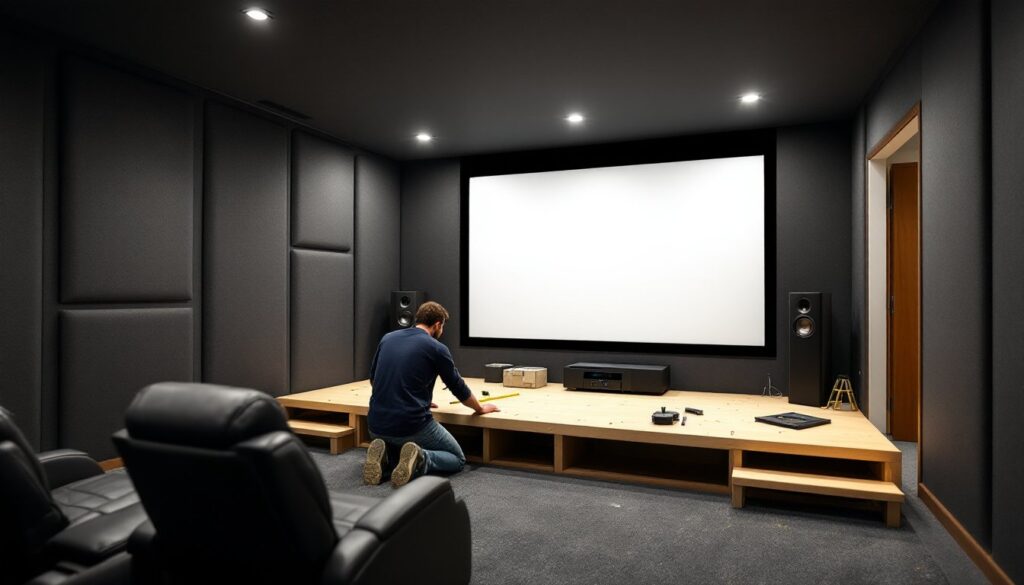
Built-in seating platforms using simple DIY plans offer customization and can incorporate storage underneath. Frame risers with 2×6 or 2×8 lumber for stability, top with 3/4-inch plywood, then add carpet and seating. Secure platforms to wall studs if possible, especially for elevated second rows.
Comfort Additions:
Install side tables or cupholders within arm’s reach of every seat. Nothing ruins immersion like pausing to retrieve a drink from across the room. Consider adding USB charging ports built into seating platforms or end tables for phones and tablets.
Climate control matters, home theaters generate significant heat from equipment. Ensure adequate HVAC coverage or add a supplemental mini-split system if the room feels stuffy during extended use.
Budgeting Your Home Theater Project
Home theater costs vary wildly based on room size, equipment quality, and how much work the homeowner tackles personally.
Budget Tiers:
Entry-level ($3,000-$6,000): 75-inch 4K TV or budget 4K projector, 5.1 receiver and speaker package, basic seating, minimal acoustic treatment. Adequate for casual viewing and perfect for someone testing the waters before committing to a full build. budget-friendly equipment recommendations for cost-effective component combinations.
Mid-range ($8,000-$15,000): Quality 4K projector and screen, separate AV receiver and speakers (not package deals), two rows of dedicated theater seating, acoustic panels at reflection points, professional screen installation or complex TV mounting.
High-end ($20,000+): Premium projector with HDR support, motorized screen or large OLED display, object-based surround (Atmos/DTS:X) with in-ceiling speakers, extensive soundproofing, custom seating with automation, professional calibration and integration.
Cost-Saving Strategies:
Handle demolition, painting, and acoustic panel installation personally. These tasks require more patience than skill. Hire out electrical work, projector installation, and A/V calibration, mistakes here waste money and time.
Buy previous-generation equipment. Last year’s receiver or projector often performs 90% as well as current models at 50% of the price. Refurbished speakers from reputable manufacturers carry warranties and sound identical to new.
Phase the project. Start with core equipment and basic seating, then add acoustic treatment, automation, and upgraded seating as budget allows. A phased approach also provides time to learn the system and identify actual needs versus initial assumptions.
Hidden Costs:
Don’t forget cables, wall plates, equipment racks, universal remotes, calibration tools, and painter’s tape for cable management. Budget an extra 10-15% beyond equipment costs for these necessities. Factor in potential permit fees if soundproofing or electrical work requires inspection.